

Log in to the Dashboard via https://dashboard.pexcard.com
Find the external bank account that should be relinked.
- Under the ‘Online Validation’ column, you will see it labeled ‘Unlinked’.
Follow the steps provided by the Instant Account Verification via Open Banking Providers linking dialogue.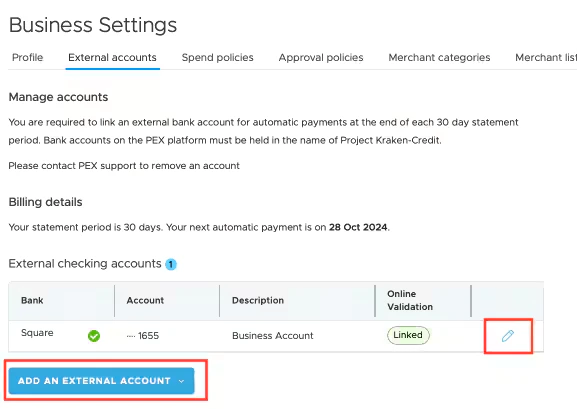
- Follow the steps eventually leading you to your bank’s login portal to provide your credentials for verification.
- If the relinking method described above results in an error message, you can try adding the same account or another bank account with the “Add an External Account” button on the main “External accounts” page. Adding a duplicate bank account this way will fully replace it with a fresh Instant Account Verification via Open Banking Providers connection. To duplicate the bank account, click on the dropdown arrow option on the blue Add an External Account button.
You will be guided through the same Instant Account Verification via Open Banking Providers linking dialogue, though there may be additional verification steps depending on your bank. Once the bank account has been linked, the Online validation field showing unlinked should update to linked. Linked banks can be used for Same Day ACH transfers.
FAQ
Why does my bank account become unlinked?
Why does my bank account become unlinked?
- Sometimes the Instant Account Verification via Open Banking Providers link for your external bank account can become unlinked. This usually happens if you make a change to your banking login credentials or Instant Account Verification via Open Banking Providers have made updates that require a customer to relink. For some banks, the Instant Account Verification via Open Banking Providers link can also time out. Your bank may email to notify you if your bank account becomes unlinked. You can verify if your bank account has become unlinked by navigating to your bank account on your PEX dashboard by going to Business settings-> External accounts. It will be listed under the “Online validation” column and will reflect as either linked or unlinked.
Can I make transfers via Same Day ACH if my bank account is unlinked?
Can I make transfers via Same Day ACH if my bank account is unlinked?
- No, you can not make Same Day ACH transfers from your unlinked external bank accounts.
Can I make ACH transfers if my bank account is unlinked?
Can I make ACH transfers if my bank account is unlinked?
- Yes, you can make ACH transfers from your unlinked external bank accounts. However, you won’t be able to make Same Day ACH transfers if your external bank account gets unlinked. Try relinking, duplicating, or readding the bank account with the above steps.
How do I add a new external bank account?
How do I add a new external bank account?
- Click on the ‘Add an external account’ button at the bottom of the ‘External accounts’ page, agree to the terms, and follow the steps provided by the Instant Account Verification via Open Banking Providers linking dialogue.